
-
Introduction
-
Server-Side FAQ (SSR)
2.1. Where to install the Server-Side FAQ
2.2. How to optimize the FAQ page for SEO and AEO
2.3. Use Quinta Design ON/OFF
2.4. Integration Method -
Verification
3.1. How to check that your FAQ is properly installed
1. Introduction
Q-SEO is a feature that automatically generates FAQ content from Q-Data through an installable script. Two formats are available.
-
The Server-Side FAQ (SSR) generates the FAQ HTML + JSON-LD schema directly on your server, before the page is sent to the visitor. It is the only approach AI crawlers (ChatGPT, Claude, Perplexity, Gemini…) can read directly from the page source.
-
The static FAQ allows you to display fixed, topic-based questions and answers.
This article explains how to install both formats, how to optimize your FAQ pages for SEO and AEO, and how to verify that your implementation is correct.
2. Server-Side FAQ (SSR)
2.1. Where to install the Server-Side FAQ
You can install the Server-Side FAQ in two ways:
-
On a dedicated FAQ page (recommended).
-
At the bottom of the homepage.
A dedicated page offers better performance for search engines and a clearer user journey. It is also the most reliable way for AI assistants to read your answers directly from the page.
2.2. How to optimize the FAQ page for SEO and AEO
To improve visibility in both Google results and AI-generated answers, you should create a dedicated page titled “Official FAQ of [Hotel Name]”. This title should appear in:
-
the page URL
-
the meta title
-
the meta description
Recommended elements:
- Title of the page (structure H1): Official FAQ of [Hotel Name]
- Meta title: Official FAQ | [Hotel Name] | Your Questions Answered
- Meta description: Visit the official FAQ of [Hotel Name] to find clear and reliable answers to the most common questions about reservations, check-in, services, and more.
-
Suggested URL: www.[hotelname].com/official-faq
To ensure optimal internal visibility, link the FAQ page from:
-
the main navigation menu
-
the website footer
-
a highlighted section of the homepage
Examples of FAQ implementations :
💡Tips: You should implement "IndexNow" (to speed up the appearance of your content in AI-generated results) and the LLMS.txt file
LLMS.txt is a technical file similar to robots.txt that allows you to indicate the pages or content you want Large Language Models (LLMs), such as ChatGPT, Claude, Perplexity and Google, to use. This is important because it allows you to control how the AI models and response engines access, use or index the content
2.3. Use Quinta Design — ON / OFF
| Quinta Design | Result |
| ON | The server renders the Quinta accordion, styled with your Visual style settings (Color, Border radius, Transition). |
| OFF | The server renders raw, unstyled markup that you style yourself with your own CSS. |
⚠️ Important: Server-Side Rendering (SSR) is the only method that guarantees AI crawlers can read your FAQ content directly in the page source, without executing JavaScript.
If Quinta Design OFF, you must implement:
- A "For Loop"
This loop retrieves and displays the individual FAQ items (question and answer) from the JSON data returned by the script's backend. - CSS Structure (Cascade)
You'll need to define a proper HTML structure and accompanying CSS classes (or use your site’s styles) to visually format the questions and answers as an accordion or a readable list.
⚠️ Please make sure to override or adjust the default CSS for the H2 elements.
Here is an example of rendering with PHP ( Quinta design Off):
<div class="faq-accordion">
<?php foreach ($faqs as $faq): $fid = $faq['identifier']; ?>
<div class="faq-item">
<h2 class="faq-question-heading">
<button class="faq-question" aria-expanded="false" aria-controls="a-<?= htmlspecialchars($fid) ?>" id="q-<?= htmlspecialchars($fid) ?>">
<span class="faq-icon" aria-hidden="true">▲</span>
<?= htmlspecialchars($faq['name']) ?>
</button>
</h2>
<div class="faq-answer" id="a-<?= htmlspecialchars($fid) ?>" role="region" aria-labelledby="q-<?= htmlspecialchars($fid) ?>" hidden>
<div class="faq-answer-inner"><?= $faq['acceptedAnswer']['text'] ?></div>
</div>
</div>
<?php endforeach; ?>
</div>
2.4. Integration method
The integration code is automatically generated in your Q-SEO dashboard under Server-side FAQ → Integration method. Simply select your language (Node.js, PHP, or Python) and click Copy.
Below the design block, choose your server language and copy the generated code to add it to your server. The code calls Quinta, receives the FAQ HTML + JSON-LD, and outputs it in your page.
Available languages: Node.js, PHP, Python.
Pick your language, then use Copy to grab the code and add it to your server.
💡 Tip: Replace top: '20' with any other number to change how many entries are published. Add the topics parameter to publish specific Q-Data topics, e.g. dialogIds: '17-21,19-41'.
For individual hotel pages, it is recommended to include a specific FAQs section with an anchor in the submenu. This will facilitate navigation, especially if the section is at the bottom of the page.
Let Claude do it for you:
Note: To implement the Server-Side FAQ, simply share this documentation along with the code generated in your Q-SEO dashboard (Server-side FAQ → Integration method) with Claude - it will have everything it needs to set it up correctly.
3. Verification
3.1. How to check that your FAQ is properly installed
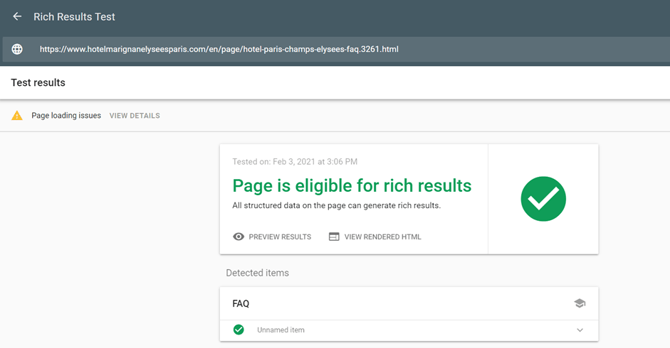
To verify that your structured data is valid and that your page is eligible for rich results, use Google’s Rich Results Test: https://search.google.com/test/rich-results
Common Mistakes
-
Missing or incorrect Hn structure (must include one H1; Quinta outputs questions as H2).
-
Adding structured data without rendering the FAQ HTML (nothing visible).
-
Not overriding H2 CSS, resulting in oversized questions.
-
Calling the API on multiple pages without hotel filtering (duplicate content).
-
Not linking the FAQ page in navigation or footer.
-
Missing FAQ page URL in the XML sitemap.